Packaging for Fedora: fuzzytail! Watching logs on your terminal

If you are an experienced fedora packager or even if you are starting out, you probably have come across COPR and its tooling, right? Well, if you have, then you know how painful it is, for each build, to come back to the UI and keep refreshing manually to watch your logs in “real time”.
This is where fuzzytail comes to the party!
What is fuzzytail?
fuzytail is an small application that let you interact with your builds in COPR, either by looking at the status of the build or by watching the logs live.
By no means fuzzytail replaces the copr-cli, it is actually meant to be an extension to aid packagers to visualize their build logs in the terminal instead of using the UI.
By the time you see yourself packaging 5+ upstream projects to Fedora, you probably will end up going crazy trying to watch the builds and figuring out what exactly happened to your failed ones, this is where fuzzytail enters to shiny!
As a developer, it is much, much, much more comfortable for me to look at stuff in my own terminal instead of my web browser, it makers me feel like a hacker, you know? And fuzzytail is helping me keeping this feeling while I prepare builds for various packages.
Fantastic! How do I get fuzzytail?
fuzzytail is available from pypi, therefore, a simple:
1
2
3
4
5
pip install fuzzytail

# or

pipx install fuzzytail
Will get you to the latest version.
How do I use fuzzytail?
To get started with fuzzytail is actually pretty simple. All you have to do is run the following command on your terminal after you get it installed:
1
fuzzytail <owner>/<project>
By default, fuzzytail will start in the watch mode, meaning that, once you specify the owner and project that you are interested in, it will stream the logs directly to your terminal, that’s the most basic execution mode for the program.
Don’t believe me? Here, take a look!
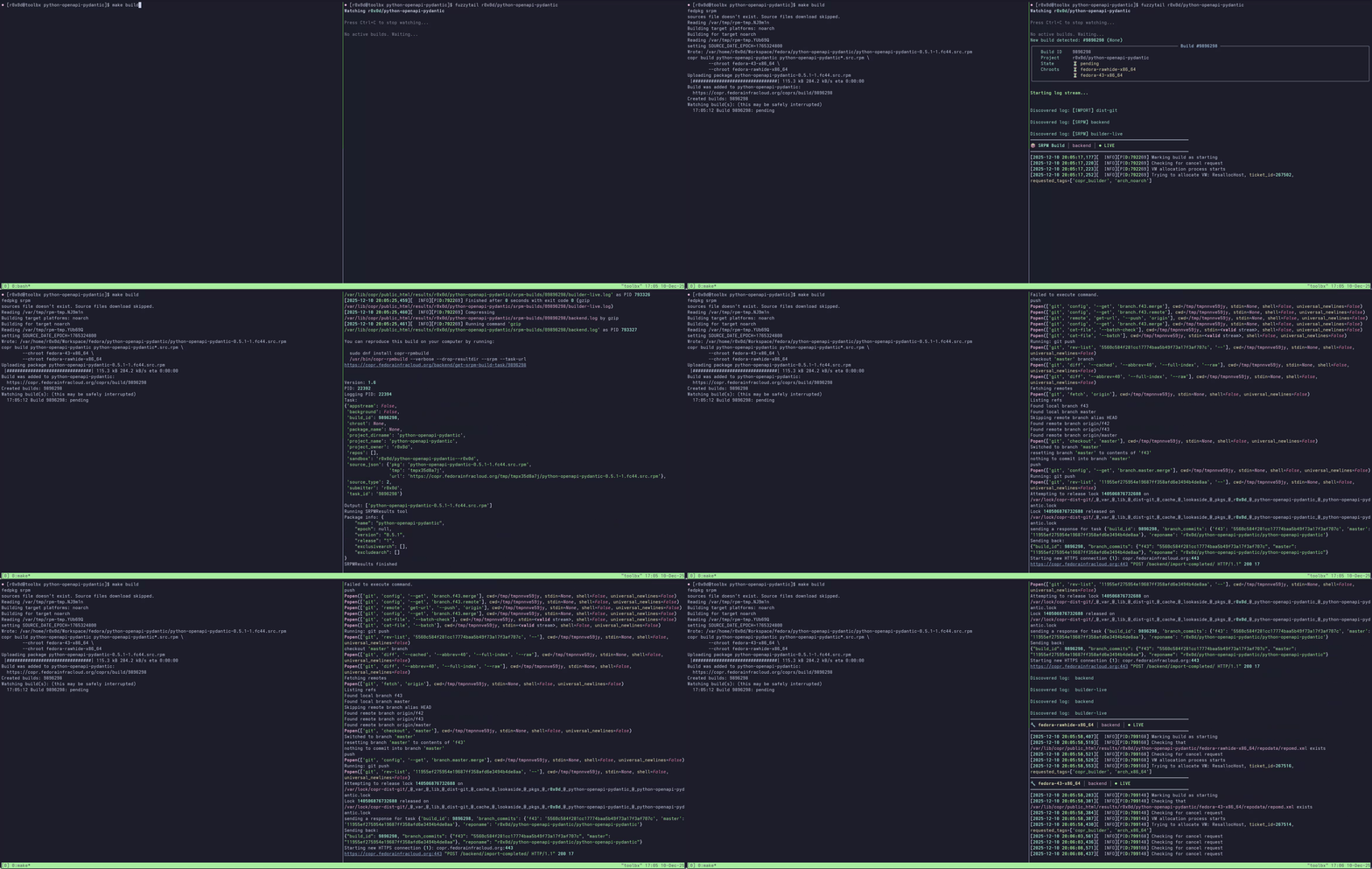 A gif showing fuzzytail streaming the logs in a split terminal while the build happens
In case you don’t want to stream the logs directly, it is also possible to view the logs after they happen with:
1
fuzzytail logs <owner>/<project>
Filtering for chroot logs
fuzzytail has the ability to allow you to select which chroot logs you want to see during the build. Maybe you only care about fedora-43-x86_64, and not about rawhide or fedora 42 and etc. With fuzzytail, this is easily selected with the --chroot parameter:
1
fuzzytail <owner>/<project> --chroot fedora-43-x86_64
Filtering for build logs only
In some cases, you might not want to see all copr build logs, like srpm, import, backend, etc. Maybe you just care about the actual rpm log, because that’s what is important for you right now, and thinking in that, fuzzytail also has a mode to allow you to specify which logs you want to capture and display in your terminal:
1
2
3
4
5
# Will only show the rpm build logs
fuzzytail <owner>/<project> --rpm-only

# Will only show the srpm build logs
fuzzytail <owner>/<project> --srpm-only
Checking build status
fuzzytail also has a nice command for you to check the status of the builds (without getting their logs). This command is useful for quickly finding out if your long-running build has failed or succeeded!
1
fuzzytail builds r0x0d/python-openapi-pydantic
That will generate the following output:
1
2
3
4
5
6
7
8
9
10
11
12
13
14
┏━━━━━━━━━┳━━━━━━━━━━━━━━━━━━━━━━━━━┳━━━━━━━━━━━━━━┳━━━━━━━━━━━━━━━━━━━━━━━━━━━━━━━━━━━━━━━━━┓
┃      ID ┃ Package                 ┃ State        ┃ Chroots                                 ┃
┡━━━━━━━━━╇━━━━━━━━━━━━━━━━━━━━━━━━━╇━━━━━━━━━━━━━━╇━━━━━━━━━━━━━━━━━━━━━━━━━━━━━━━━━━━━━━━━━┩
│ 9896298 │ python-openapi-pydantic │ ❌ failed    │ fedora-43-x86_64, fedora-rawhide-x86_64 │
│ 9896292 │ python-openapi-pydantic │ ❌ failed    │ fedora-43-x86_64, fedora-rawhide-x86_64 │
│ 9896235 │ python-openapi-pydantic │ ❌ failed    │ fedora-43-x86_64, fedora-rawhide-x86_64 │
│ 9896230 │ python-openapi-pydantic │ ❌ failed    │ fedora-rawhide-x86_64, fedora-43-x86_64 │
│ 9878007 │ python-openapi-pydantic │ ❌ failed    │ fedora-rawhide-x86_64, fedora-43-x86_64 │
│ 9877978 │ python-openapi-pydantic │ ❌ failed    │ fedora-43-x86_64, fedora-rawhide-x86_64 │
│ 9877438 │ python-openapi-pydantic │ ❌ failed    │ fedora-43-x86_64, fedora-rawhide-x86_64 │
│ 9877277 │ python-openapi-pydantic │ ✅ succeeded │ fedora-43-x86_64, fedora-rawhide-x86_64 │
│ 9869333 │ python-openapi-pydantic │ ✅ succeeded │ fedora-rawhide-x86_64, fedora-43-x86_64 │
│ 9869332 │ python-openapi-pydantic │ ❌ failed    │ fedora-43-x86_64, fedora-rawhide-x86_64 │
└─────────┴─────────────────────────┴──────────────┴─────────────────────────────────────────┘
Contributing to fuzzytail
All types of contributions are very welcome to the project! If you are interested in contributing, whether with code, documentation, or even reporting problems, please feel free to do so through the repository on Github. ======= ||||||| parent of 1d95630 (packaging posts) ======= — layout: post title: ‘Packaging for Fedora: fuzzytail! Watching logs on your terminal’ tags:
- fedora
- packaging
- tooling
- fuzzytail image: path: “/assets/imgs/fuzzytail.jpg” alt: A relaxing fox sleeping date: 2025-12-10 17:22 -0300 — If you are an experienced fedora packager or even if you are starting out, you probably have come across COPR and its tooling, right? Well, if you have, then you know how painful it is, for each build, to come back to the UI and keep refreshing manually to watch your logs in “real time”.
This is where fuzzytail comes to the party!
What is fuzzytail?
fuzytail is an small application that let you interact with your builds in COPR, either by looking at the status of the build or by watching the logs live.
By no means fuzzytail replaces the copr-cli, it is actually meant to be an extension to aid packagers to visualize their build logs in the terminal instead of using the UI.
By the time you see yourself packaging 5+ upstream projects to Fedora, you probably will end up going crazy trying to watch the builds and figuring out what exactly happened to your failed ones, this is where fuzzytail enters to shiny!
As a developer, it is much, much, much more comfortable for me to look at stuff in my own terminal instead of my web browser, it makers me feel like a hacker, you know? And fuzzytail is helping me keeping this feeling while I prepare builds for various packages.
Fantastic! How do I get fuzzytail?
fuzzytail is available from pypi, therefore, a simple:
1
2
3
4
5
pip install fuzzytail

# ou

pipx install fuzzytail
Will get you to the latest version.
How do I use fuzzytail?
To get started with fuzzytail is actually pretty simple. All you have to do is run the following command on your terminal after you get it installed:
1
fuzzytail <owner>/<project>
By default, fuzzytail will start in the watch mode, meaning that, once you specify the owner and project that you are interested in, it will stream the logs directly to your terminal, that’s the most basic execution mode for the program.
Don’t believe me? Here, take a look!
A gif showing fuzzytail streaming the logs in a split terminal while the build happens
In case you don’t want to stream the logs directly, it is also possible to view the logs after they happen with:
1
fuzzytail logs <owner>/<project>
Filtering for chroot logs
fuzzytail has the ability to allow you to select which chroot logs you want to see during the build. Maybe you only care about fedora-43-x86_64, and not about rawhide or fedora 42 and etc. With fuzzytail, this is easily selected with the --chroot parameter:
1
fuzzytail <owner>/<project> --chroot fedora-43-x86_64
Filtering for build logs only
In some cases, you might not want to see all copr build logs, like srpm, import, backend, etc. Maybe you just care about the actual rpm log, because that’s what is important for you right now, and thinking in that, fuzzytail also has a mode to allow you to specify which logs you want to capture and display in your terminal:
1
2
3
4
5
# Will only show the rpm build logs
fuzzytail <owner>/<project> --rpm-only

# Will only show the srpm build logs
fuzzytail <owner>/<project> --srpm-only
Checking build status
fuzzytail also has a nice command for you to check the status of the builds (without getting their logs). This command is useful for quickly finding out if your long-running build has failed or succeeded!
1
fuzzytail builds r0x0d/python-openapi-pydantic
That will generate the following output:
1
2
3
4
5
6
7
8
9
10
11
12
13
14
┏━━━━━━━━━┳━━━━━━━━━━━━━━━━━━━━━━━━━┳━━━━━━━━━━━━━━┳━━━━━━━━━━━━━━━━━━━━━━━━━━━━━━━━━━━━━━━━━┓
┃      ID ┃ Package                 ┃ State        ┃ Chroots                                 ┃
┡━━━━━━━━━╇━━━━━━━━━━━━━━━━━━━━━━━━━╇━━━━━━━━━━━━━━╇━━━━━━━━━━━━━━━━━━━━━━━━━━━━━━━━━━━━━━━━━┩
│ 9896298 │ python-openapi-pydantic │ ❌ failed    │ fedora-43-x86_64, fedora-rawhide-x86_64 │
│ 9896292 │ python-openapi-pydantic │ ❌ failed    │ fedora-43-x86_64, fedora-rawhide-x86_64 │
│ 9896235 │ python-openapi-pydantic │ ❌ failed    │ fedora-43-x86_64, fedora-rawhide-x86_64 │
│ 9896230 │ python-openapi-pydantic │ ❌ failed    │ fedora-rawhide-x86_64, fedora-43-x86_64 │
│ 9878007 │ python-openapi-pydantic │ ❌ failed    │ fedora-rawhide-x86_64, fedora-43-x86_64 │
│ 9877978 │ python-openapi-pydantic │ ❌ failed    │ fedora-43-x86_64, fedora-rawhide-x86_64 │
│ 9877438 │ python-openapi-pydantic │ ❌ failed    │ fedora-43-x86_64, fedora-rawhide-x86_64 │
│ 9877277 │ python-openapi-pydantic │ ✅ succeeded │ fedora-43-x86_64, fedora-rawhide-x86_64 │
│ 9869333 │ python-openapi-pydantic │ ✅ succeeded │ fedora-rawhide-x86_64, fedora-43-x86_64 │
│ 9869332 │ python-openapi-pydantic │ ❌ failed    │ fedora-43-x86_64, fedora-rawhide-x86_64 │
└─────────┴─────────────────────────┴──────────────┴─────────────────────────────────────────┘
Contributing to fuzzytail
All types of contributions are very welcome to the project! If you are interested in contributing, whether with code, documentation, or even reporting problems, please feel free to do so through the repository at:
No description available